
Building a semantic model in Tableau Next is not simply a matter of connecting tables and defining relationships. The semantic layer adds the context that helps both people and analytics agents understand what the data means. Semantic models provide a consistent way to interpret data by mapping it to familiar business terms and standardized business logic.
That context becomes especially important for conversational analytics. Clear table and field descriptions, intentional field visibility, and accurate relationships give an analytics agent more information to correctly interpret a question and determine how the underlying data should be used. Salesforce specifically notes that accurate semantic-model descriptions improve agent response accuracy. As conversational analytics becomes an expectation, the semantic layer gives analysts a way to reduce ambiguity, clarify domain-specific language and jargon, and provide the business rules and policy context needed to interpret the data correctly
The challenge is the scale.
Tableau has already embedded AI assistance into semantic model authoring. Its Semantic Description Generator can draft descriptions for semantic model entities, and other AI-assisted capabilities can help with tasks such as relationship suggestions and support for calculated fields syntax. These capabilities can make an individual task faster, but analysts can still face the time-consuming work of moving through a large model entity by entity: opening a table or field, generating or reviewing the suggestion, making adjustments, and saving the result. Across hundreds of fields, the bottleneck shifts from writing descriptions to processing them individually.
A typical source inventory may already contain table names, field names, data types, and even basic descriptions. But descriptions such as “Project Status: the status of the project” add very little semantic value. What is missing is often the context that distinguishes one plausible interpretation from another: what the field represents in this business, terminology users are likely to use when referring to it, and any rules or conventions that affect how it should be interpreted.
In this tutorial, I show how I used a custom Claude Skill to approach that problem at the model level rather than one field at a time. Starting with a spreadsheet containing basic metadata about the model, Claude evaluates fields in the context of their tables and surrounding data, develops richer descriptions designed to support both human understanding and conversational analytics, and then uses Salesforce’s semantic-layer APIs to apply those updates programmatically. Salesforce’s Authoring API supports creating and customizing semantic models and their definitions programmatically.
The goal isn’t to remove human judgment from semantic modeling. It’s to stop spending that judgment on hundreds of repetitive clicks. AI can help interpret context, surface ambiguity, draft stronger semantic definitions, and apply changes at scale. The model owner still reviews the results and decides what belongs in the trusted semantic layer.
Tutorial Video
In this short demonstration, I start with a four-table HR model. The tables have no relationships or descriptions and contain several system-generated fields per table, adding unnecessary clutter. Then I use a custom Claude Skill to enrich the metadata, hide selected fields, and construct relationships based on knowledge from the database team or on your understanding of how the tables fit together.
The same workflow is applied to a larger model whose automatic configuration had produced many-to-many relationships. By using a spreadsheet that recorded the intended keys and cardinality, the Skill replaces those defaults with the appropriate relationships for the model.
Show/Hide Transcript
Celia Fryar: This month in our DDC, we’re gonna be talking about Tableau Plus and Tableau Next, and how to use the agentic element within our environments.
One of the main features here is being able to build the semantic model in Tableau Next. And I have a recommendation for being able to speed up how that’s gonna work.
I’ve worked with Claude to build some skills, and I wanna just demonstrate for you how that might look.
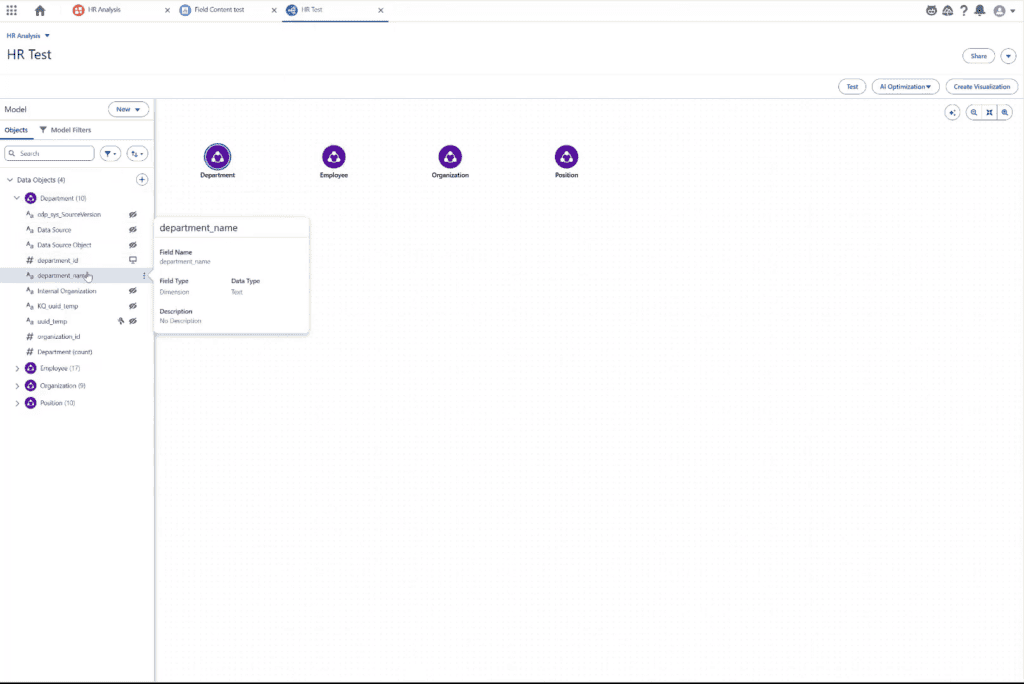
I have four tables here from an HR model. You can see that they don’t have any relationships, nor do they have any descriptions. Not at the table level, not at the field level.
And I also have some system-generated fields that are gonna be kind of in the way.
I did have a data… did have a description in my spreadsheet, albeit fairly simple. So I worked with Claude to enrich those descriptions.
You can see on screen it will improve here now. We can use up to two hundred fifty-five characters, so I wanted to go ahead and use the space to do a good job of giving both our users and our agent good context.
Next thing, I wanted to hide those system-generated fields so that they’re not in the way. Anything that’s gonna introduce ambiguity needs to go.
Next, I brought in the relationships that I had documented in my spreadsheet. I was able to get it to learn a skill to bring in, and those one-to-many, set those up for me.
Came through and I’m validating ’em now.
You can see on screen that worked out well.
The next thing on deck is gonna be for us to bring in those descriptions. It is so great to be able to ask it to come all at once rather than going field by field, table by table.
Now, there’s a really solid description in here for every column and every table.
You come into the Edit Properties dialogue, you can see the full expanse of it, but that reduces ambiguity and really helps configure the semantic model to perform well.
Now, brought those lessons back to my bigger model I was working on, and I had… ended up kind of boxed in with some many-to-many relationships all the way through on a auto configuration.
But I had over in a spreadsheet what the cardinality needed to be, and so that’s what I needed to have Claude Skill bring over and install for me, and it did it perfectly.
As you will see here, just with one execution after I taught it the skill, then we got the one-to-manys in the proper places, and I went through and just needed to validate the relationships against my list, and it worked out just really great.
Saved a lot of time, and I’d be happy to share this with you so it can save you some time as well.
Thanks for watching!
Step-by-Step Guide to Using AI to Build Context at Scale
1. Start with the Metadata You Already Have
Begin with a structured spreadsheet that captures the metadata already available about the tables and fields in your semantic model. In the HR example, the spreadsheet includes information such as table name, field API name, field label, data type, example values, key information, field type, and the existing description.
The existing descriptions do not need to be complete. In fact, many may be little more than restatements of the field label. The value comes from giving Claude enough surrounding context to evaluate a field in relation to the table and the other fields around it, rather than treating each description as an isolated writing task.
Your spreadsheet does not need to follow this exact structure. Useful inputs can include:
- Table name and field API name
- Business-facing field label
- Data type and example value
- Primary key and foreign key, when available
- Field type, such as Dimension or Measure
- Existing description
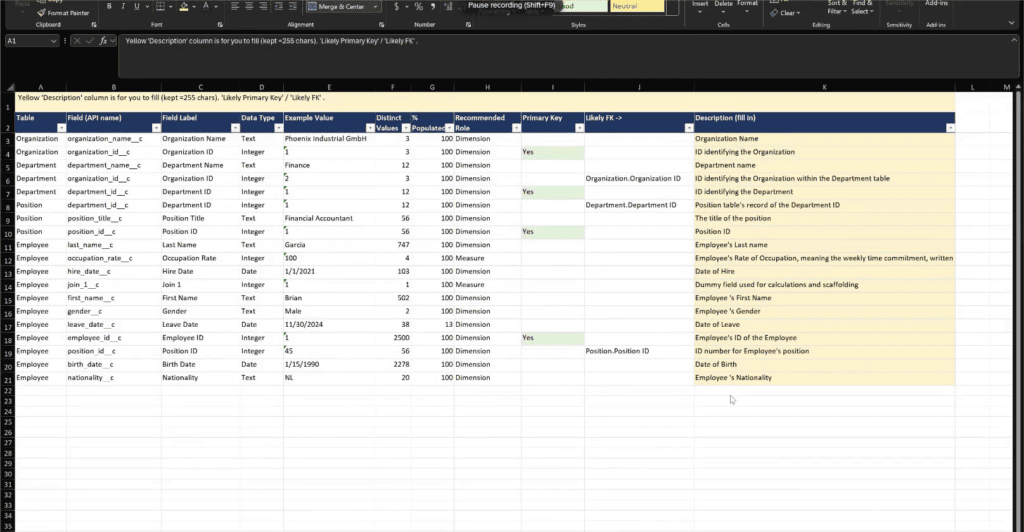
Together, these details give the AI evidence it can use to identify ambiguity, interpret domain-specific terminology, and develop descriptions that provide more useful business context.
Treat this spreadsheet as a reusable metadata asset, not a one-time input. Keeping it current can provide a consistent source of context for future semantic model updates and make the enrichment process repeatable.
2. Strengthen Table and Field Descriptions
Short or cryptic labels rarely provide enough business context on their own. A description such as “Organization Name” simply restates the field label without helping a person or analytics agent understand what the field represents or how it should be interpreted.
In the demo, Claude reviews the existing descriptions alongside the surrounding table and field metadata, then rewrites them to provide more meaningful context before they are loaded into Tableau Next. Depending on the field, that may mean clarifying ambiguous terminology, explaining domain-specific language, identifying where the field fits within the HR hierarchy, or documenting business context that affects how the field should be understood.
The goal is not to make every description longer. It is to use the available description space intentionally, adding the context that helps remove ambiguity while keeping the result concise and easy to scan.
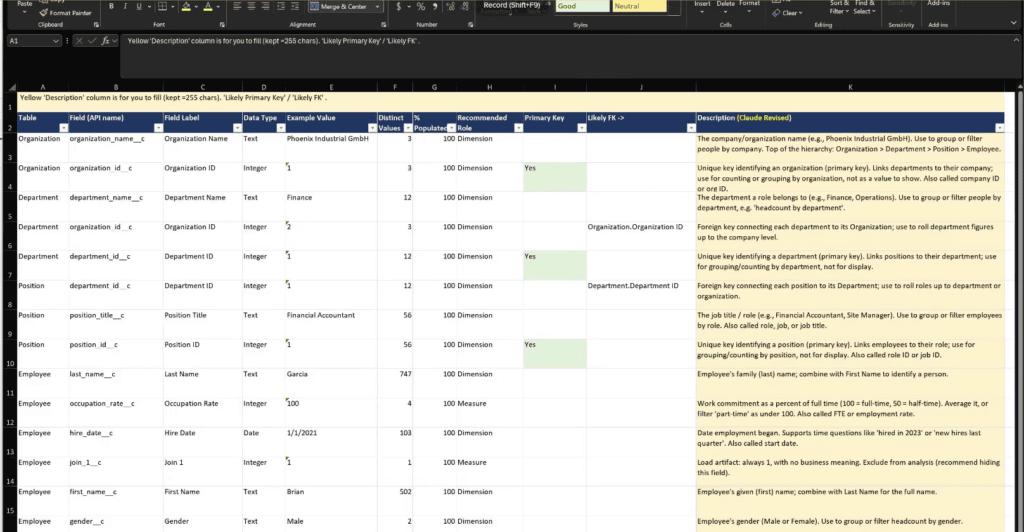
A useful description should clarify the business meaning of the field and any context needed to interpret it correctly. For keys, that may include the entity or record they identify. For measures, it may include the unit, calculation, or expected aggregation. Dates, status fields, acronyms, and domain-specific terms may require additional explanation to remove ambiguity or capture business-specific conventions.
Claude can use the surrounding metadata to produce stronger descriptions at scale, helping transform basic technical metadata into richer semantic context for both business users and conversational analytics.
3. Turn the Workflow Into a Reusable Skill
Once the metadata structure, semantic guidelines, and update process are established, they can be packaged into a custom Claude Skill. The Skill captures the instructions for the workflow so the same process can be applied consistently across models without rebuilding the approach each time.
For this use case, the Skill teaches Claude to evaluate available metadata, strengthen table and field descriptions, identify and hide unnecessary system fields, and validate or update key relationship settings. It also defines how those changes are applied programmatically through the available Salesforce API tools.
The value of the Skill is not simply that it repeats a series of commands. It preserves the method behind the work: what context Claude should consider, what makes a description useful for conversational analytics, which changes can be automated, and where the existing metadata should guide the result.
Keeping that scope explicit makes the workflow both repeatable and adaptable as the semantic model evolves.
4. Remove Fields That Add Unnecessary Ambiguity
Not every field in the underlying data model needs to be exposed for analysis. System-generated and technical fields may serve an important platform purpose while adding little business meaning for someone exploring the semantic model.
Leaving those fields visible can clutter the analytical experience and, more importantly, introduce unnecessary ambiguity for conversational analytics. Multiple IDs, system timestamps, or similarly named technical fields can give an analytics agent additional candidates to consider when interpreting a question.
In the HR example, fields that do not contribute useful business context are hidden from the analytical experience rather than removed from the underlying model. The Claude Skill can apply those visibility settings programmatically across the model instead of requiring each field to be updated individually. update.
This is not a reason to hide every technical field. Keep fields that are necessary for calculations, troubleshooting, governance, or specialized analysis. The objective is an intentional semantic model in which the fields exposed for analysis have a clear purpose and provide useful context for both business users and analytics agents.
5. Apply Documented Relationships and Cardinality
Descriptions explain what the data means, while relationships define how the tables connect. In the HR example, the spreadsheet documents the primary and foreign keys that connect Organization, Department, Position, and Employee, along with the expected cardinality of each relationship.
The Claude Skill uses that documented structure to create or update the relationships programmatically. Once the changes are applied, the model moves from four disconnected tables to a connected semantic model. We then review the relationships in Tableau Next to confirm the matching fields and cardinality.

The larger model demonstrates why this can matter at scale. During its initial model generation, many of the relationships were assigned many-to-many cardinality. Because the intended keys and relationship structure had already been documented, the Skill could apply the correct configurations across the model in a single execution rather than requiring each relationship to be edited individually.
Relationship settings should be based on the data, not on which configuration appears cleaner on the canvas. Use known keys, data profiling, and domain knowledge to determine the appropriate cardinality. When the available evidence does not support a more specific relationship, leave the existing setting in place until it can be validated.
6. Validate the Model Before You Trust It
Automation can accelerate semantic model development, but the results still need to be validated in Tableau Next.

Before relying on the model for conversational analytics, confirm that:
- Table and field descriptions accurately reflect the business meaning and provide useful context.
- Hidden fields are appropriate for the intended analytical audience and use cases.
- Relationship fields connect the correct tables and fields.
- Cardinality matches the actual structure of the data.
- Common business questions return results at the expected level of detail.
Validation should include both inspection of the semantic model and realistic analytical questions. A relationship can appear correct on the canvas but still produce unexpected results when the data is queried. Likewise, a description may sound reasonable while still leaving an important term, rule, or business-specific interpretation ambiguous.
Testing the model with the kinds of questions people will actually ask helps reveal where additional context is still needed before the semantic model becomes a trusted resource for dashboards, metrics, and conversational analytics.
Why Semantic Context Matters for Analytics Agents
Tableau’s guidance for AI-ready semantic models emphasizes clear labels, complete descriptions, low ambiguity, and consistent metadata. The objective is to give AI agents enough business context to interpret the model reliably rather than forcing them to infer meaning from technical names or incomplete definitions.
Each part of the semantic model contributes to that context. Strong descriptions clarify business meaning, domain terminology, and important rules or conventions. Accurate relationships establish how information across tables can be combined. Intentional field visibility reduces unnecessary ambiguity by limiting the analytical surface to fields with a useful purpose.
Together, these choices help the semantic model communicate not only what data is available, but how the business understands it. That provides a stronger foundation for conversational analytics and for the people who work directly with the model.
This workflow builds on the semantic-first principles covered in Meaning Before Metrics: Preparing Your Data for Tableau Next. Business meaning still comes first. Automation makes it possible to add and maintain that context much more efficiently and consistently.
Scale the Workflow Across the Model
The four-table HR model provides a useful way to demonstrate and validate the workflow because every change can be inspected quickly. But the value of automation becomes much more apparent as the semantic model grows.
In the larger model shown in the video, the same process can evaluate and strengthen descriptions across many fields, apply visibility decisions, and update documented relationship configurations in a coordinated pass. Instead of repeating the same authoring steps across dozens or hundreds of individual semantic elements, the Skill applies a consistent methodology across the model.
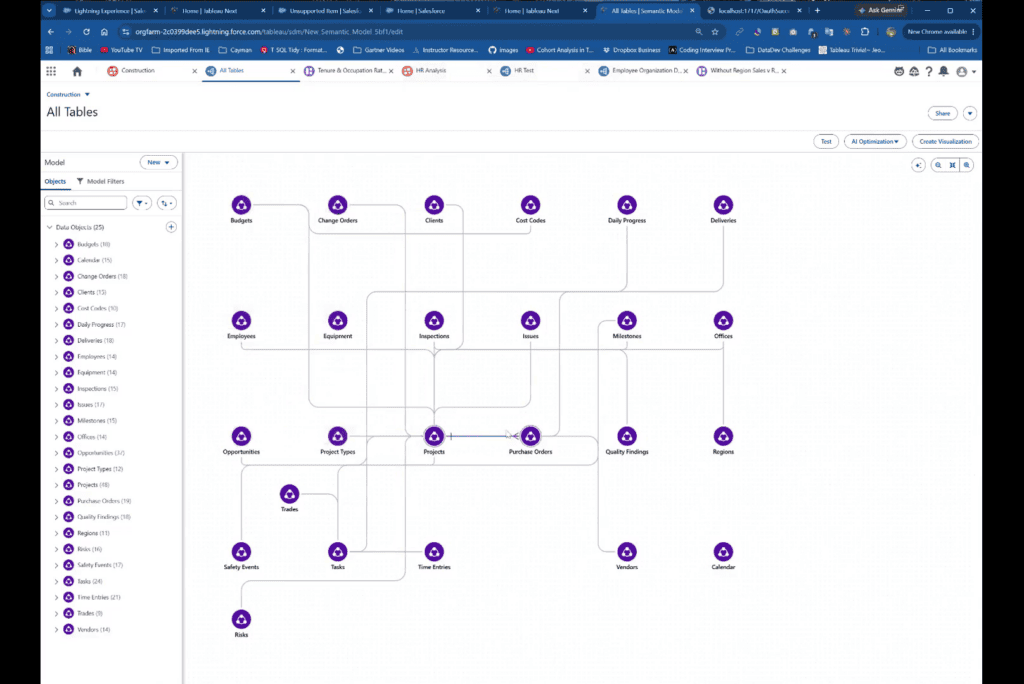
That shift is where the time savings become significant. The analyst can spend less time moving from field to field and more time reviewing the quality of the semantic context, resolving genuine ambiguity, and validating whether the model supports the questions the business actually wants to ask.
Want Help Preparing Your Semantic Model for the Tableau Agent?
At XeoMatrix, we help organizations design and refine semantic models that provide the business context Tableau Next needs for trusted analytics and conversational experiences. That includes strengthening metadata and descriptions, reducing ambiguity, defining relationships, and validating that the model supports the questions your users and analytics agents need to ask.
Whether you are building a proof of concept or scaling Tableau Next across the organization, we can help you create a semantic model that is easier to understand, maintain, and trust.